The NSF ACCESS program offers four distinct allocation types, each calibrated for a different stage of research and level of computational need. Understanding how they differ — in credit limits, application burden, and review formality — is the first step toward a successful allocation strategy.
This guide breaks down all four types, explains what each application requires, and offers a practical framework for choosing the right entry point.
Key Takeaways
- ACCESS provides free access to supercomputing, GPU resources, and storage through a credit-based system with four project types: Explore, Discover, Accelerate, and Maximize
- Credit limits range from 400,000 (Explore) to 3,000,000 (Accelerate), with Maximize awarded in direct resource units and no program-wide cap
- Explore and Discover accept applications on a rolling basis; Accelerate and Maximize require panel review on a twice-yearly cycle
- Treat the four types as a progression: start with Explore to build usage history, then scale up as your project demands increase
- Vague credit estimates and missing benchmarking data are the most common reasons Accelerate and Maximize proposals fail
What NSF ACCESS Allocations Are
ACCESS — the Advanced Cyberinfrastructure Coordination Ecosystem: Services & Support — replaced XSEDE on September 1, 2022, as NSF's primary program for connecting researchers to national computing infrastructure. The resources available include supercomputing clusters, GPU nodes, large-memory systems, cloud environments, and research storage, all accessible without a supporting grant.
The Credit System
ACCESS uses a universal credit currency that researchers exchange with specific Resource Providers (RPs) — institutions like SDSC, PSC, and TACC that operate the actual hardware. One ACCESS credit is approximately one core-hour of compute time or 1 GB of storage, but exchange rates vary by system and resource type.
Because rates differ across Resource Providers, the ACCESS Exchange Calculator is essential for converting credit amounts into actual compute time on a specific cluster before choosing an allocation tier.
What "Allocation" Means
An allocation in ACCESS is a project's approved share of a shared resource. Allocation types (also called project types or opportunities) each carry a defined credit ceiling and a corresponding review process. Choosing the right type upfront determines how quickly your project can access resources — and how much justification you'll need to provide to get there.
The Four NSF ACCESS Allocation Types
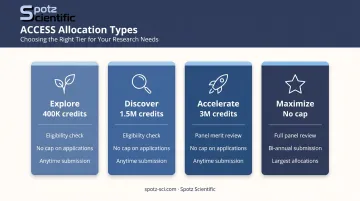
The four types form a spectrum from lightweight, no-review access to full merit-reviewed competition. The right entry point depends on where the project is in its lifecycle and how well resource needs are already understood.
| Type | Credit Limit | Review Type | Accepted |
|---|---|---|---|
| Explore | 400,000 | Eligibility check | Anytime |
| Discover | 1,500,000 | Eligibility check | Anytime |
| Accelerate | 3,000,000 | Panel merit review | Anytime |
| Maximize | No program cap | Full panel merit review | Bi-annual |
Explore ACCESS
Explore is the entry point, and a strategically useful one. Applications require only a 1–2 paragraph project summary and PI/Co-PI CVs. Decisions typically come within two weeks, and multiple Explore requests can run simultaneously.
Best for:
- First-time ACCESS users establishing benchmarks
- Graduate student projects (students can serve as PI with advisor documentation)
- Code porting, testing, and development work
- Small classes or training sessions
The 400,000-credit ceiling sounds modest, but it's often enough to validate whether a project's computational assumptions are correct before requesting a larger award.
Discover ACCESS
Discover steps up to 1.5 million credits with a one-page proposal covering research objectives and resource justification. Like Explore, it accepts applications anytime with no panel review — just an eligibility and resource-suitability check.
Best for:
- Projects with an active NSF or other federal grant
- NSF Graduate Research Fellowship holders
- Mid-size computational workflows with documented resource needs
- Campus Champions managing institutional research computing
The one-page proposal requirement keeps the application lightweight while the added justification helps reviewers confirm that the requested resources match the described work.
Accelerate ACCESS
Accelerate is where the process becomes formally competitive. Up to 3 million credits are available, but the application requires a three-page proposal and a panel merit review — proposals are evaluated by expert reviewers on scientific merit, computational planning, and demonstrated need.
The three-page limit is tight. It must cover:
- Research objectives
- Compute, storage, and other resource estimates
- Computational plan and software dependencies
- Team preparedness and prior usage history
That last item — prior usage history — carries real weight. Prior usage from an Explore or Discover allocation shows reviewers that the team can operate at scale. Without it, even technically strong proposals struggle to pass review.
Maximize ACCESS
Maximize is reserved for large-scale work that exceeds the Accelerate ceiling. There is no program-wide credit cap — awards are made in direct resource units based on what Resource Providers can supply.
The application is correspondingly substantial: a ten-page main proposal, a five-page Code Performance and Resource Costs document, two-page CVs per person, and a progress report for renewals.
Maximize also runs on a bi-annual submission cycle with fixed windows — missing one means a six-month wait:
| Submission Window | Review Meeting | Award Start |
|---|---|---|
| June 15–July 31, 2026 | Aug. 31, 2026 | Oct. 1, 2026 |
| Dec. 15, 2026–Jan. 31, 2027 | March 8, 2027 | April 1, 2027 |
Best for:
- Large collaborative projects spanning multiple grants
- Science gateways with growing user communities
- Projects that have outgrown Accelerate and have strong usage documentation
Build preparation time into the project timeline well in advance of the target window.
How to Choose the Right Allocation Type
Allocation type selection is a strategic decision that should reflect three things: the project's current maturity, how precisely resource needs are understood, and whether there is prior ACCESS or HPC usage to reference.
The Progression Pathway
ACCESS is explicitly designed for researchers to start small and scale up. Unlike XSEDE, ACCESS allows multiple simultaneous allocations of the same type — researchers can hold several Explore projects at once, for example. This makes the progression pathway low-risk.
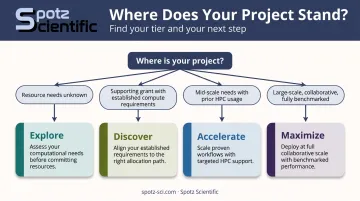
A practical decision framework:
- Resource needs unknown → Start with Explore, benchmark, then reapply
- Project has a supporting grant and established compute requirements → Discover
- Mid-scale needs documented with prior HPC usage to cite → Accelerate
- Large-scale, collaborative, and fully benchmarked → Maximize
Estimating Credits Before Applying
Before selecting a tier, use the ACCESS Exchange Calculator to map specific compute needs (GPU hours, CPU hours, storage in TB) to the Resource Providers you plan to use. Exchange rates vary widely across systems, so the same workload can cost very different credit amounts depending on which cluster runs it.
Getting those numbers wrong is one of the most frequent causes of mid-project resource exhaustion. A supplement request can help, but smaller opportunities are capped at a one-time supplement of half the original allocation ceiling, and approval is not guaranteed.
What Goes Into an ACCESS Allocation Request
Proposal requirements scale directly with allocation tier.
| Type | Core Requirements |
|---|---|
| Explore | Project abstract, PI/Co-PI CVs (advisor letter if graduate student PI) |
| Discover | Explore materials + 1-page proposal with resource justification |
| Accelerate | 3-page proposal with computational plan, benchmarking/prior usage data |
| Maximize | 10-page main proposal, 5-page code performance document, 2-page CVs, progress report for renewals |
Regardless of tier, every proposal should clearly state:
- Scientific goals and why this research requires the specific resources requested
- A credit estimate with documented methodology (not just a number)
- The team's computational readiness — software, workflows, personnel
For Accelerate and Maximize, where peer review is involved, proposal quality directly affects the outcome. The ACCESS Allocation Review Committee manual lists three formal evaluation criteria:
- Appropriateness of Methodology
- Appropriateness of Research Plan
- Efficient Use of Resources
Proposals that can't address all three typically face reduced awards or rejection.
Researchers pursuing Accelerate or Maximize allocations who want an outside perspective before submission can work with Spotz Scientific, a scientific computing consulting firm led by former DOE ASCR program manager Dr. Bill Spotz. Services include red team proposal review and strategic advisory tailored to peer-reviewed allocation tiers.
Common Mistakes Researchers Make When Selecting an Allocation Type
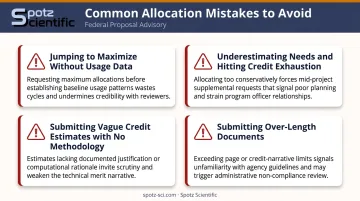
Researchers across career stages make a handful of predictable mistakes when selecting an allocation tier. Each one is avoidable with the right preparation.
Jumping to Maximize or Accelerate without prior usage data. Reviewers expect evidence the team can consume resources at scale. A proposal claiming 2.5 million credits with no benchmarking history is unconvincing regardless of how strong the science is.
Underestimating needs and selecting Explore for a Discover-scale project. Credit exhaustion mid-project is a real outcome. Supplement requests take time and are capped — waiting several weeks for a partial supplement can stall work at a critical stage.
Treating the credit estimate as a formality. A request for "1 million credits for molecular dynamics simulations" with no supporting calculation is a red flag in panel review. Reviewers expect a methodology: number of jobs × wallclock hours per job × exchange rate for the target system. This principle applies at every tier, not just Maximize.
Submitting over-length documents. ACCESS is explicit: over-length documents will not be accepted, and unrequested supplementary materials will not be reviewed. Page limits are enforced, not treated as soft guidelines.
Frequently Asked Questions
What is NSF ACCESS and what are ACCESS allocations?
NSF ACCESS (Advanced Cyberinfrastructure Coordination Ecosystem: Services & Support) is a federally funded program providing researchers free access to supercomputing, storage, and cloud resources. Researchers apply for allocations — approved shares of these resources — through a credit-based system that requires no supporting grant to participate.
What are the different types of NSF ACCESS allocations?
The four project types are Explore, Discover, Accelerate, and Maximize. They differ in credit limits (400K to 3M+), application length (one paragraph to ten pages), and review process: from a basic eligibility check to a full biannual panel merit review.
What is the difference between Explore and Discover ACCESS allocations?
Explore (up to 400,000 credits) requires only a brief abstract and CVs. It's designed for benchmarking, code testing, and first-time users. Discover (up to 1.5 million credits) adds a one-page proposal with resource justification and works best for projects with documented computational requirements and an active supporting grant.
How do ACCESS credits work?
ACCESS credits are a universal currency exchanged for compute time and storage at specific Resource Providers, with exchange rates varying by system. Use the ACCESS Exchange Calculator to convert your credit estimate into actual hours on a specific cluster before applying.
Who is eligible to apply for an NSF ACCESS allocation?
Researchers from any field at U.S. academic institutions, nonprofits, national labs, and qualifying FFRDCs can apply, including faculty, postdocs, and graduate students. Graduate students can serve as PI for Explore and Discover with an advisor letter. No external grant funding is required.
Can I move from one ACCESS allocation type to a larger one as my project grows?
Yes. Start with Explore to establish usage history, then apply for Discover or Accelerate as resource needs grow and become better documented. Prior usage data from smaller allocations is one of the strongest supporting elements in any larger allocation proposal.